About Wireless DCP
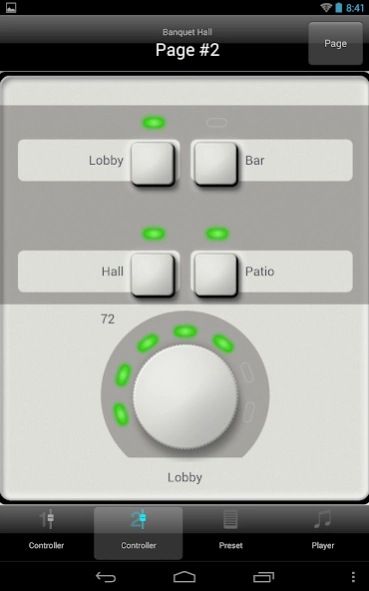
Wireless DCP is an application for Android devices that provides remote control of Yamaha MTX/MRX series Signal Processors. The application provides simple, intuitive graphical templates, which allow users, such as venue...
Wireless DCP is an application for Android devices that provides remote control of Yamaha MTX/MRX series Signal Processors. The application provides simple, intuitive graphical templates, which allow users, such as venue staff to control the following functions of the MTX/MRX processor –
• Volume levels
• On/Off controls
• Preset recall
• Play music or announcements from SD card
A list of tested Android devices is available from www.yamahaproaudio.com
Please note that this app is designed for use with Yamaha MTX/MRX hardware and MTX-MRX Editor software. The demo mode allows you to view how the app looks and performs with a range of demonstration projects.
Privacy Policy
This application will never collect nor externally transfer personal data stored in your smartphone / tablet.
This application performs following functions for purposes described below.
- Making a connection under WiFi-enabled environment
The application uses WiFi function on your mobile terminal for the purpose of operating network-enabled devices.
Notice
Some of Android devices support a cellular connection. If your device can run the Android OS 6 or later version with this feature, the cellular connection works in preference to other network connections of your device.
Therefore, If you use the Wireless DCP Application with the state that a Wi-Fi router has no connection to the internet, the MTX/MRX device which is located on the local network, cannot be detected automatically based on the priority of this connection.
In this case, your device will be able to connect to the MTX/MRX device by performing one of the following operations.
1. If you are figured the dialog which shows the network has no Internet access, Please change to a local network connection for keeping a connection.
2. You can specify the proper IP address of the MTX/MRX device by using the Manual IP function that the Wireless DCP Application supports.
----------
*By sending your inquiry to the e-mail address below, Yamaha may use the information you provide and may forward it to any third party in Japan and even in other countries, so that Yamaha can answer your inquiry. Yamaha may keep your data as business record. You may refer the right on personal data such as right in EU and shall post inquiry again through the e-mail address when you find problem on your personal data.
Previous Versions
Here you can find the changelog of Wireless DCP since it was posted on our website on 2016-12-30 03:56:52.
The latest version is 1.2.7 and it was updated on 2026-10-06 10:43:41. See below the changes in each version.
Wireless DCP version 1.2.7
Updated At: 2024-09-11
Changes: - Several minor bug fixes.
Wireless DCP version 1.2.5
Updated At: 2020-05-27
Changes: - Fixed some bugs on the display.
- Fixed the problem that option menu doesn't appear on Android 9 or later version
Disclaimer
Official Google Play Link
We do not host Wireless DCP on our servers. We did not scan it for viruses, adware, spyware or other type of malware. This app is hosted by Google and passed their terms and conditions to be listed there. We recommend caution when installing it.
The Google Play link for Wireless DCP is provided to you by apps112.com without any warranties, representations or guarantees of any kind, so access it at your own risk.
If you have questions regarding this particular app contact the publisher directly. For questions about the functionalities of apps112.com contact us.